

Educational Technology Usage Within a Classroom: Educator Perspective
After using Post-it Plus, I will attest that it is a valuable tool to learn about and use in the classroom. Post-it Plus is an accessible tool that allows written or digital Post-its to be arranged and categorized into the user’s choice of organization or pre-structured templates. The online or app form of the content will give the user three starter templates to choose from: Quickstart, ToDos, Brainstorm, and the plus button option to structure a unique board.
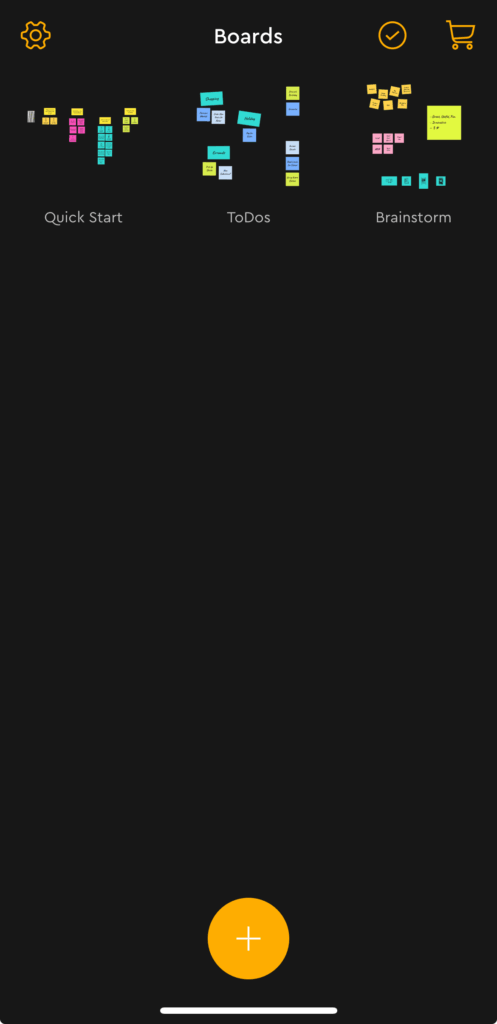
There, the user can edit post-its, change the color, and orient the design however they want. If the user has physical Post-its, they can snap a picture of their Post-its, and the app will transform their information into a digitized version where they can manipulate and organize the Post-its. This app can be used at any classroom level for student and teacher organization. The app and online version are straightforward to follow. There aren’t many steps besides taking a picture or writing down thoughts to organize. The app might work best in a class where students are learning a new topic, studying, or prepping for a project (really anything that forces students to plan preemptively).
Usefulness in a School Library
The Post-it app is handy in a school library because of its flexible nature; like the library, the app adapts to the needs of the students and individual learning. For example, if students prefer a more hands-on writing approach, they can write down their ideas and then upload them to the app. Likewise, if students prefer typing, they can stick to the technological version of the Post-it. The app can be used in any class and subject and works perfectly for the various needs of the school library.
Implications
While I don’t have any explicit negative criticisms of the app, the layout, or the usage of the material, I will say the app itself is pretty simple. For the student and teacher, that can be both a pro and a con. For example, in regards to a large-scale project where a student uses one app to hold all of their ideas, I don’t know if the Post-it Plus app would be best suited for a large production as there are other apps (Canva, Notability, Notion, etc.) that have a not identical but similar features that might be more useful for a larger project. However, in the exact opposite situation, if a student gets overwhelmed by bigger platforms with so many options, it might be helpful to have a simple app like Post-it Plus for their needs. So, with that in mind, while this can be used for all grade levels, I can see how it would be most useful for demographics less familiar with technology (because of its simplicity) and prefer an easier design and layout (perhaps younger students).
Accessibly
The app is highly accessible and free for phone, tablet, or computer use. While an account is not necessary, the creation process is quick and direct, and again, the app’s features are straightforward. What I most appreciate about the app is that it is entirely free, unlike similar apps with in-app purchases; everything you need is just a few clicks away, whether you have physical post-its or not.
Overall
While I wouldn’t say that Post-it Plus is life-changing or has unique features, it is a straightforward tool I am excited to have in my tool belt. Overall, this app would work best for people who are not super technology-savvy, appreciate straightforward design, and need to organize their thoughts. In my mind, the app would work best to outline a paper/project, create a mind map, or an assignment requiring planning and brainstorming.